
Event Staff App
Event staff app your crew will actually use
Everything your crew needs sits in one app: shifts, briefings, check-in and pay. Liveforce is the event staffing app that lets them handle it all, so you chase far less.
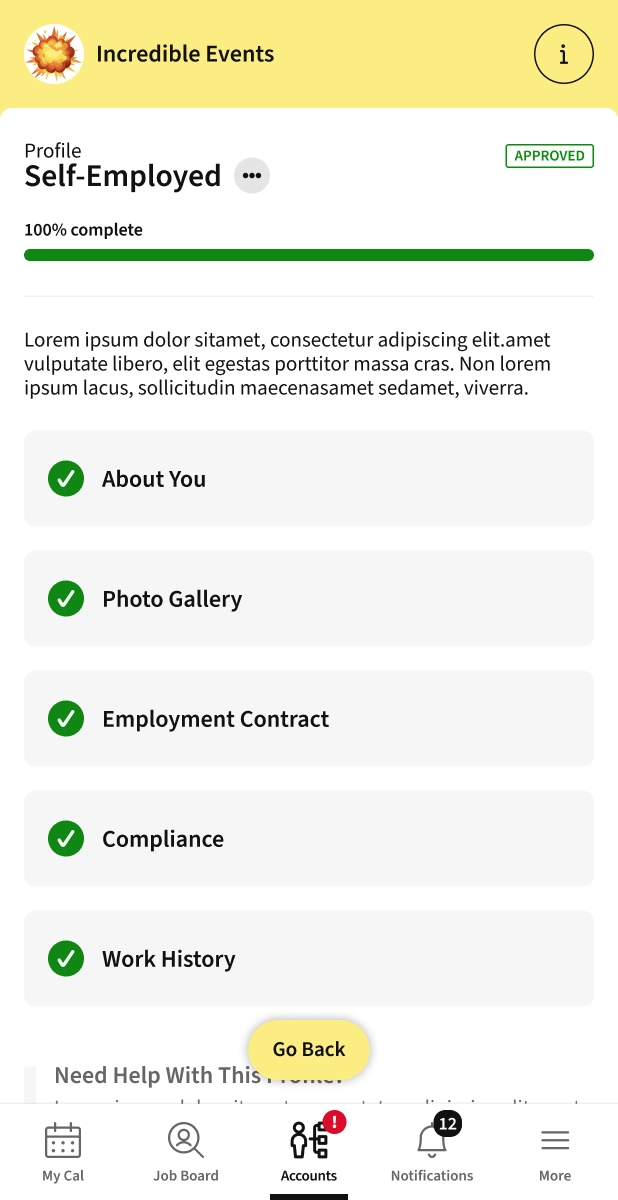
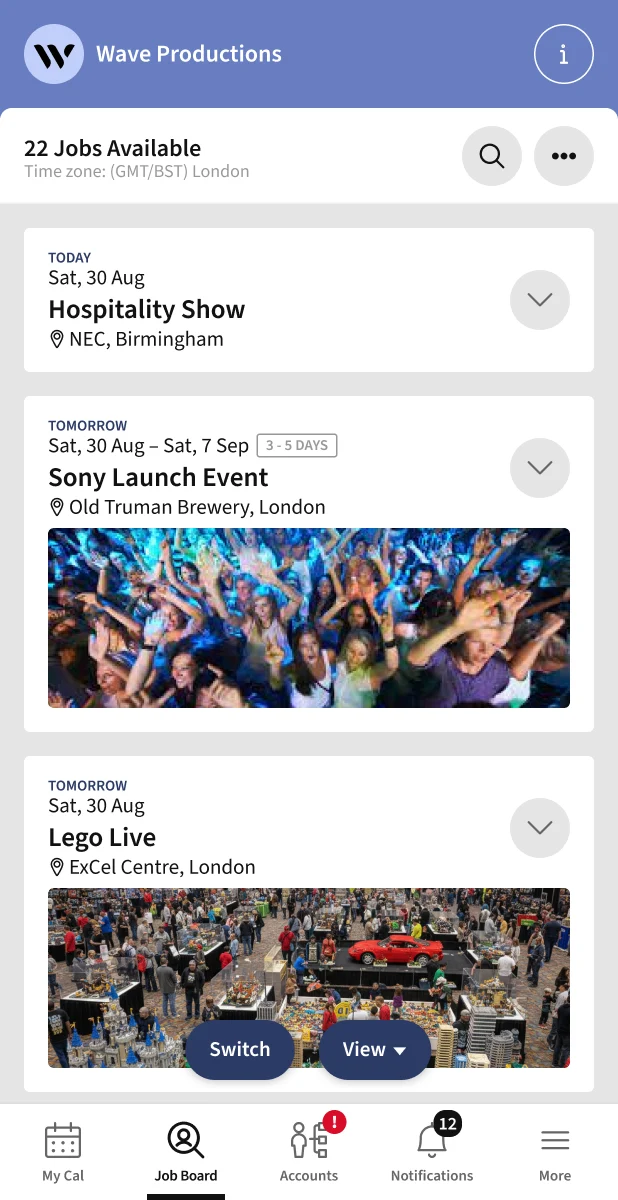
One app for your Crew
Built for the people on the ground
This is the one event crew app your team needs to work with you. Shifts, briefs, check-in and payment all live in it, so you stay in control from the first job to the final payout.

Onboard
Crew ready, without the admin
Crew fill in their own profile, and you approve who joins. A workforce that’s ready to book, without you chasing paperwork.

fill shifts
Post a shift, watch it fill
Crew see open roles on your private job board, or accept a direct invite in a tap. Shifts get filled fast, by people who fit.

Keep informed
Update everyone, instantly
Briefings, call times and sudden changes go out by push, email or SMS, only to the crew on that shift, so nothing gets lost in the noise.

Pay right
Hours in, pay sorted
Hours are submitted automatically when a shift ends, and expenses come in with a photo. Payday is built from accurate data, not guesswork.

Onboard
One profile, ready to work
-
Crew fill in their profile once, adding skills, certificates and availability, and it's ready to submit for approval.
-
In one crew management app, you decide who joins your workforce; approve or decline applications before they're part of your database.
-
One login covers every agency they crew for, so there's no separate account or password to set up for each one.
Fill shifts
From open shift to crew on site

Find work
-
Every shift you post lands in the app, ready to accept in a tap, or crew can browse and apply through your own private job board.
-
Crew sets their availability, so you only offer shifts to people who can actually work them.
-
If a role gets more applicants than spots, strong candidates can be shortlisted and kept on a reserve bench for next time.

On the day
-
Every booked shift sits in one calendar, with the full brief attached.
-
Directions to the door are built in, so no one calls asking where to go.
-
A tap confirms attendance before the shift, so you know who is coming.
-
GPS check-in and check-out on site, so hours are accurate from the start.
Keep informed
Every update, on their phone

-
Briefings, call times and sudden changes arrive by push, email or SMS.
-
Only the crew on that shift get the message, so nothing gets lost in the noise.
-
Reminders to confirm and check in go out automatically.
-
It keeps every message in one place, so crew can find it again later.
Branding & customisation
Make it unmistakably yours
Every agency gets its own logo and colours as standard. Want to go further with your own event workforce app under your own name? White-Label is available as an upgrade.

Branded pages in the Liveforce Crew App
-
Add your logo and colours to your pages within the Liveforce Crew App, included as standard.
-
Push notifications and emails carry your logo and colours, so every message looks like it's coming from you.
-
Create your own Company Pages, private to your workforce, with control over who sees each one.
-
Customise the fields and data you collect during onboarding, so it fits how your agency works.

Your own White-Label Crew App
-
Published under your agency's name and icon on the App Store and Google Play, not Liveforce's.
-
Your own app icon and splash screen, so crew know it's your app the moment they open it.
-
Web access on a custom domain that's fully your own, with emails sent from your own address instead of ours, on our top plans.
-
No mention of Liveforce anywhere crew can see. This is your operation, top to bottom.
-
Dedicated support to get your white-label app set up and live, so the switch is handled for you.
Our offering
One platform. Every tool your team needs.
With Liveforce, you get tightly connected modules that cover your entire operation, from the first brief to the final timesheet.

Customisable
Configure Liveforce to fit the way your agency works: your data, your workflows, your brand.

Extend & upgrade
Add more capability as you grow: built-in extensions, enterprise features and integrations, ready when you need them.
Workforce Manager

Recruit
An Applicant Tracking System built for events. Customise your application process, manage every applicant, and invite the right crew to join.

Schedule & Book
Create multiple schedules, promote to your private job board, invite and book crew, from one shift to a hundred.

Timesheets & Pay
Track timesheets, check crew in and out, and manage overtime. Run payment reports and automatically request crew invoices.

Comms
Message crew one-to-one or broadcast to everyone, by email, SMS, push or in-app chat. Automated reminders take care of the rest.

Crew Database
Your single system of record for every worker. Customise what data you collect, store certificates and other documents. Group crew by region, classification or however you work, and keep it all validated and up to date.
Crew App

Event Staffing App
A dedicated app for your field team, staff and crew. Crew can access every shift, briefing and update in one place. Download it as a mobile app or view it in a web browser. Customise with your own branding or get a standalone white-label version.
FAQs
Frequently asked questions
An event staff app is the mobile app your crew use to run their work with you, seeing shifts, reading briefings, checking in on site and submitting hours, all in one place. For an agency, it replaces the WhatsApp groups, phone calls and paper timesheets that break down once you are managing staff across multiple events. Liveforce is the event staffing app built for exactly this: one app your crew will actually use, connected to the platform your ops team runs behind it.
In the app, crew accept or browse open shifts, set their availability, read the full brief with directions to the door, confirm attendance, and check in and out on site by GPS. Hours are submitted automatically when a shift ends, and expenses go in with a photo, so pay is built from accurate data rather than guesswork. Briefings, call times and last-minute changes reach only the crew on that shift, by push, email or SMS, and stay in one place they can find again.
The Liveforce Event Staff App is available on both iPhone and Android, and crew can also use it in any web browser without installing anything. Staff download the app once from the App Store or Google Play, set up a single profile, and they are ready to be booked. There is no separate app to install for each agency they work with.
Yes, one Liveforce login covers every agency a crew member works for, so there is no separate account or password for each one. They keep a single profile with their skills, certificates and availability, and each agency they join sees only what it needs. For your agency, that means faster onboarding and a workforce that is ready to book.
Yes, every agency gets its own logo and colours in the Crew App as standard, and push notifications and emails carry your branding so every message looks like it comes from you. If you want to go further, the White-Label upgrade publishes the app under your own name and icon on the App Store and Google Play, with no mention of Liveforce anywhere your crew can see.
The app is private to each agency’s own workforce, Liveforce is the system agencies use to manage their crew, not a public job board or marketplace. Each agency is responsible for hiring, onboarding and paying its own staff, and Liveforce does not run a central job list or register crew directly. For your agency, that means the crew you build and the shifts you post stay yours, seen only by the people you have approved.
The best event staff app is the one your crew will actually open. It should put shifts, briefings, check-in, and pay in a single place and connect straight to how your ops team schedules and books.
Get started
Run every event.
With complete control.
Pick a time below. See how Liveforce fits your operation. No pressure, no pitch deck. Explore all Liveforce features in a live demo.
14-day free
|
No credit card required
|
Free 1:1 training

Not ready to book?