
For Crew
You power the events. We make managing your jobs easier.
Liveforce is the software your event agencies and suppliers use to manage your work. You work directly with those agencies. Liveforce powers the Crew App, bringing jobs from every agency that uses it together in one place.
Who is Liveforce?
You work for your agencies. We're the software connecting you.
We’re the technology your agencies use to manage your work together, making it easier to keep track of and manage your jobs.

Not a marketplace
We don’t list jobs for you to browse or match you with new agencies. You work with agencies you already know, or ones that invite you directly.

Not your employer
Your contract, pay, and job details sit with the agency, not us. They decide who gets recruited, approved, and invited to join. They also decide who gets booked onto each job.

We are the software
Liveforce is the software your agencies use to manage recruitment, scheduling, communication and timesheets with you, all in one place.
How it works
How to register and start picking up work
You register with the agencies you’d like to work with, not directly on this site. You’ll be up and running in a few steps.

STep 1
Find an agency to work with
Search for agencies you already know, or ones that have invited you directly. We don’t have a central directory, so check the agency’s own website or ask them for a link.

Step 2
Apply, or accept an invite
Apply directly through the agency’s application form, or accept an invite if they’ve already reached out. Provide the details and documents they ask for to complete your application.

Step 3
Get approved
They manage the recruitment and approval process for their own workforce. If you have any questions about your application, contact the agency directly.

Step 4
Pick up work
Once you’re approved, you can browse the agency’s private job board or get invited to jobs that fit your skills and availability.
Why Crew use the App
Everything that makes managing your jobs easier
Built to keep you organised, and in the loop, wherever you’re working.
-
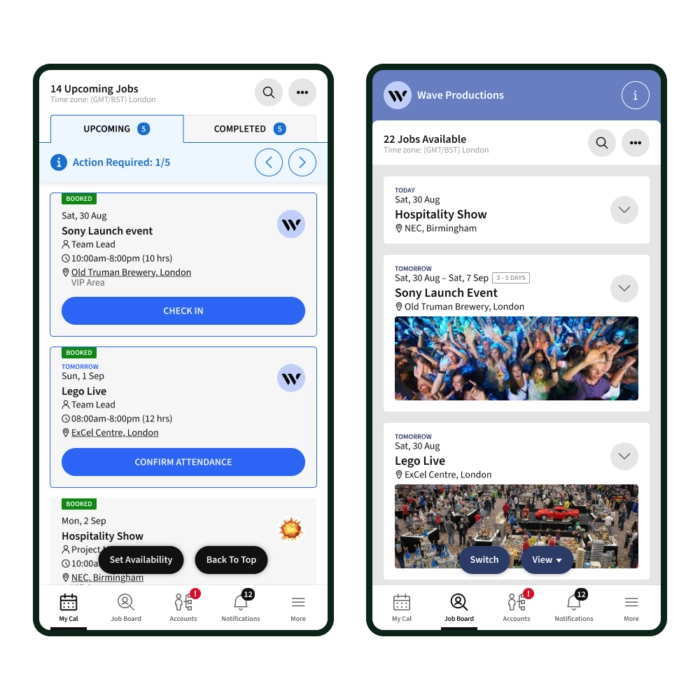
One account for every agency you work with
-
Jobs synced straight to your personal calendar
-
Browse each agency's private job board
-
Check-in and check-out via the app
-
All job briefing notes and documents in one place

-
Push notifications for shifts, briefings, and changes
-
In-app chat with your agency
-
Review timesheets and payment status
-
Submit invoices for agencies to review
-
Download the app, or access via web browser
Get the app
However you work, we've got you covered
Available on iOS and Android, or use the web version from any browser.


Getting help
Always know who to ask
Jobs and pay sit with your agency. Everything about the app sits with us.
Questions about applications, jobs or pay:
Contact your agency directly about recruitment, job invites and bookings, or timesheets and payments. You’ll find their contact details in the app’s Accounts section.
Need technical support with the Crew App:
Chat to us directly in the app, browse our knowledge base, or watch quick how-to videos — whichever’s easiest.
Frequently asked questions
No. Your agency employs you and manages your contract, pay, and job details. Liveforce is the software they use to manage that work with you.
Not directly, there’s no central directory of agencies. You’ll need to already know the agency you want to work with, or be invited by one directly.
You won’t be able to manage that work through the Crew App. It only connects you with agencies that use Liveforce.
It gives you one login for every agency that uses Liveforce, instead of a separate account for each one.
Yes. Once you’re approved by each agency, all your jobs, shifts, and briefings appear together in one account.
Yes, it’s free for every crew member.
Either, download it for iOS or Android, or use the web version from any browser.
Your agency. You’ll find their contact details in the Accounts section of the app.
Contact Liveforce support directly, via in-app chat, our knowledge base, or video guides.